.png)
Coordinated Entry System Document Readiness
Document Readiness for Housing Referrals
Overview
Document Readiness refers to the minimum documentation that must be uploaded into HMIS/Clarity before a client can be referred to a housing project through the Coordinated Entry System (CES).
This standard helps:
- Reduce housing referral denials
- Shorten the time between referral and move-in
- Support faster placement into available housing units
Clients who do not yet meet Document Readiness requirements may experience delays in referral until required documents are uploaded.
What Is Document Readiness?
A client is considered document-ready when required identity and Social Security documentation have been uploaded into HMIS/Clarity and are current.
Document Readiness is required before CES can issue a housing referral. It does not change a client’s assessment score or enrollment history.
Required Documentation for Referral
To be eligible for referral, a client must have two (2) acceptable documents uploaded into HMIS/Clarity. At least one document must verify identity.
CES accepts any two (2) of the following:
- Government-issued photo identification
- Social Security verification
- Birth certificate
Acceptable Forms of Documentation
Social Security Verification
Acceptable forms include:
- Social Security card
- Letter from the Social Security Administration showing the client’s legal name and Social Security number
- Social Security card receipt (valid for 30 days from date of issuance)
Photo Identification
Acceptable forms include:
- Government-issued photo ID
- California ID request receipt (valid for 30 days from date of issuance)
- U.S. Passport card with photo ID
Birth Certificate
- A birth certificate may be used in place of either a government-issued photo ID or Social Security verification.
- A birth certificate cannot replace both required documents.
Receipt Validity
Receipts for photo IDs or Social Security cards are valid for 30 days from the date of issue.
If a receipt is uploaded:
- The permanent document must be uploaded once received
- Expired receipts no longer meet Document Readiness requirements
How Document Readiness Affects Referrals
If a client does not have the required documentation uploaded:
- The client may not be referred to housing until documentation is complete
- The client does not lose their place in housing prioritization
- Once documentation is uploaded and verified, the client becomes eligible for referral again
Document Readiness helps ensure referrals can move forward quickly once a housing opportunity becomes available.
Where to Upload Documents in HMIS/Clarity
Documents must be uploaded directly into the client’s HMIS/Clarity under the clients program enrollment. Otherwise, the documents will not be visible on the permanent housing queue report.
- Begin by navigating to the “Programs” section in the clients profile.

- Next find the program entitled “San Luis Obispo County Coordinated Entry Program” and click the checkbox.

- Next, within the “Programs” section, navigate to the “Files tab”

- Click on “Add File”

- Navigate to the “Personal Identification Category”
-
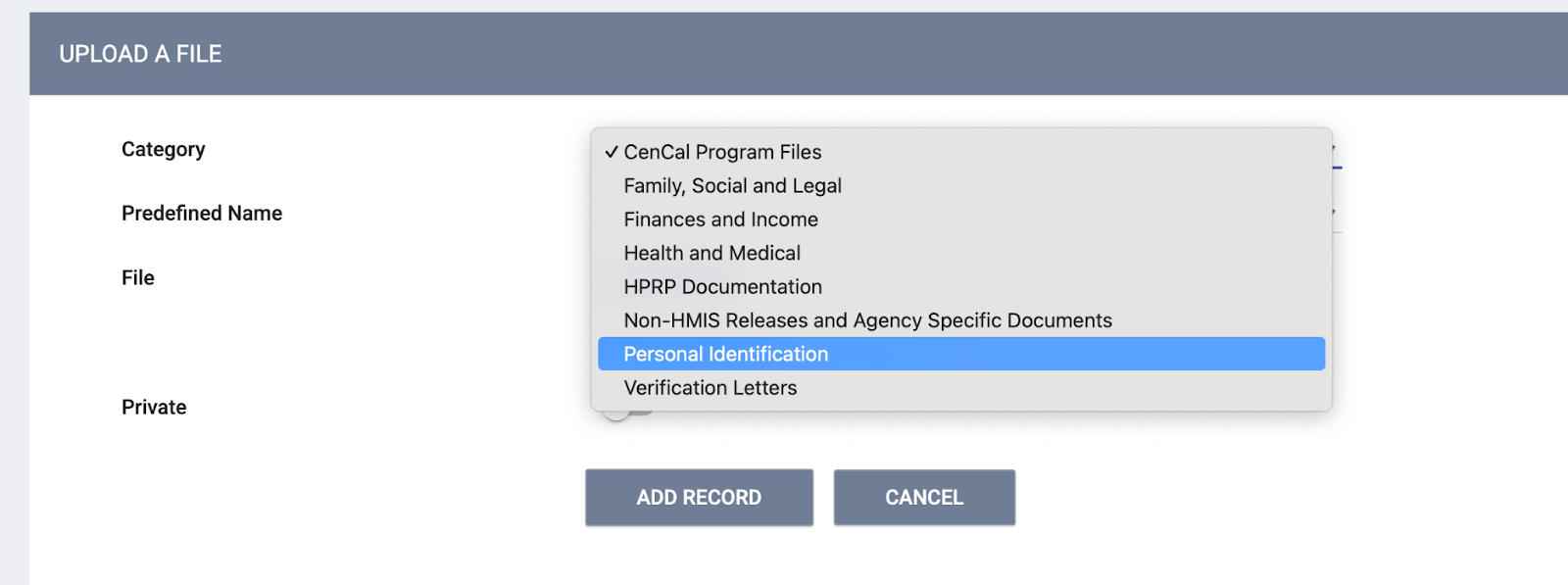
- Click Add Record

- Clear and legible
- Correctly labeled
- Current and not expired
Best Practices for Case Managers
- Upload required documents as soon as they are obtained
- Monitor receipt expiration dates and replace receipts with permanent documents
- Confirm documents are correctly uploaded and saved in HMIS/Clarity
- Notify CES if documentation has been uploaded and the client is ready for referral
Questions or Support
For questions about Document Readiness or housing referral requirements, contact Coordinated Entry System support:
HSD_CESSupport hsd_cessupport@info.co.slo.ca.us