.png)
CES Housing Providers - Referral Processing- New Clarity Interface
The following presentation reviews the referral process to Housing Providers from Coordinated Entry.

Note: This process begins with housing matchmaking and assumes the client has been enrolled in Coordinated Entry, is Active and on the Community Queue and has been prioritized for a housing match and referral.
Referral Availability > Add Openings
- From the referrals tab, choose Availaiblity and then choose the SLO County Permanent Housing Queue. The agency program list will appear:
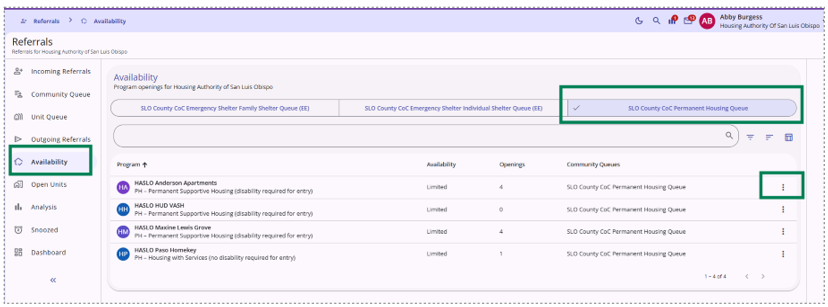
- Choose Add Openings from the elipsis menu item to the right of the program name:

- Complete the worksheet for the openings, including relevant details:

| Program Openings Fields | Description |
| Date | Date unit/ opening is available |
| Number of Openings | Add total # of units to add |
|
Notes |
Important for Matchmaker |
|
# of Bedrooms |
Total available bedrooms in unit if facility based |
|
Unit Meets ADA |
Tenant based, or if facility based - Accessible Unit (or adaptable to become accessible with reasonable accommodations) |
|
AMI – Enter Below % |
Enter the total AMI % for the income eligibility max for the unit. |
|
Facility Based Unit |
Not voucher/ tenant based, but physical facility |
|
Facility Location |
Project address if applicable for Facility Based Units |
|
Minimum Monthly Required Income for Unit |
Enter minimum income for unit if applicable |
|
Does unit or building require the use of stairs |
For facility based units |
|
Max Occupancy |
Total # of persons that can occupy the unit |
Referral Availability > View Openings

Reassignment > Referral to an opening by the CE Matchmaker

View Referrals
Pending Program Referrals in the Client Record

Pending Program Referrals in the Referrals Workspace


Edit Program Referrals in the Referrals Workspace
Acknowledge Referral - Pending- In Process

Decline Referral - Denied
Edit the current status to Denied:

|
Denied Fields |
Description |
|
Denied by Type |
Client or Provider (Guidance) |
|
Denied Reason |
Select approved reason form list |
|
Current Status |
Denied |
|
Denied Information |
Add details as appropriate |
|
Status Date |
Date of Update |
|
Send to Community Queue |
Yes - to send back to Queue, No - if client no longer needs/ wants CE Housing Interventions |
Referral denial reasons may generate an additional email requiring additional information on the denial. The information requested in the email will be uploaded to client files via Coordinated Entry Program. Users should follow the instructions in the email generated from Bitfocus Clarity:

Accept Referral - Enroll the Client
Follow the Program Enrollment Workflow to add the program enrollment. Note, a "Pending Referral (Referral Date d/m/yyyy)" will appear next to the program with the referral:

Move Client into Housing
After creating the program enrollment, update the housing move in date to confirm the client is residing in the unit.

Exit client from Coordinated Entry and any other literally homeless project enrollments.
Note: Clients enrolled in the Coordinated Entry Program will be exited automatically to the new housing project destination when the housing move-in date is added (not at the project start, unless those dates are the same). The user will select "Confirm" when the message below pops-up after adding the housing move-in date:
