.png)
DQ | CLS Assessment Monitoring
Index Information
| Report Group | Data Analysis |
|---|---|
| Report Type | Dashboard |
| Documented Version | 20260513 |
| Clarity Location | Reports > Data Analysis > San Luis Obispo Reports > Custom Data Quality (link) |
Related Resources
How to Run Data Analysis Reports in Clarity
Overview
The CLS Monitoring Report identifies the number of days since a client’s latest CLS assessment.
A Current Living Situation (CLS) Assessment should be recorded every time a client has an encounter with provider staff in the following project types: Coordinated Entry, Street Outreach, and Night by Night Shelter Enrollments.

KPI Summaries
There are three tiles at the top of the report that identify the three domains of interest relating to CLS Assessment Monitoring:
- Enrollments Without a CLS: Displays the number of active client enrollments, separated by program, that do not have a CLS recorded.
- Enrollments >60 Days No CLS: Displays the number of active client enrollments, separated by program, that not had a new one records in more than 60 days. This could mean that a client could have no CLS since program start and have been enrolled for more than 60 days, or a client's last CLS was recorded more than 60 days ago.
- No Geo on Last CLS: Displays the number of active client enrollments, separated by program, that did not have a geolocation recorded on their last CLS.
The 5th to last column of the report, Location Data, displays whether or not the most recent CLS assessment has geolocation data associated with it.
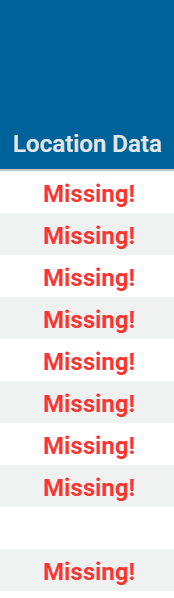
The 2nd to last column of the report, Days Since Last CLS, is color coded by tiers of latest assessment.
Yellow= greater than 60 days since last CLS assessment
Red= greater than 90 days since last CLS assessment
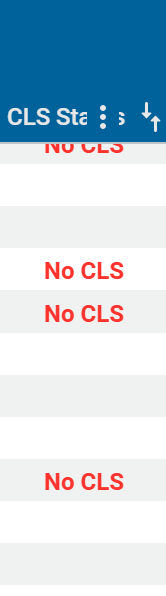
The last column of the report, CLS Status, displays whether or not the active client has had a CLS in their enrollment.
Report Filters
The CLS Monitoring Report has optional filters to select below:
Assigned Staff Home Agency: Limits results to the agency of employment of the staff member that completed the program enrollment where the CLS assessment was completed.
Assigned Staff: Limits results to the name of the staff member who created the program enrollment where the CLS assessment was completed.
Program Name: Limits results based on the name of the program where the CLS assessment was completed. A value for Program Name must be entered in order to view data.
Report Contents
These are the column headers within the report:
List of Assigned Staff- Lists the name(s) of the staff member(s) that completed the program enrollment where the CLS assessment was completed.
List of Assigned Staff Home Agency- Lists the agency(s) of employment of the staff member(s) that completed the program enrollment where the CLS assessment was completed.
Unique Identifier- Identifier used to search for the client in Clarity
Program Name- The name of the program where the CLS assessment was completed.
Project Start Date- The date the client was enrolled in the program where the CLS assessment was completed.
Project Exit Date- The date the client exited the program where the CLS assessment was completed.
Enrollment ID- The program enrollment ID associated with the enrollment where the CLS assessment was completed.
Latest Current Living Situation Date- Latest date of all CLS assessments completed for the client.
Creating Agency- Agency that recorded the CLS assessment
Location Data- Returns a status on whether or not a geolocation was recorded on the client's last CLS
CLS Status- Returns a status on whether or not a client has a CLS in their enrollment
Days Since Last CLS- count of days since last completed CLS assessment.
** Note, CLS assessments where Assigned Staff =Admin Admin and Assigned Staff Home Agency = System are a result of the migration. These assessments should be reviewed by Program Name as they are not associated with a staff member who recorded the CLS.